Learning OpenGL : Framebuffer Capture
Goal
Make a way to "screenshot" or capture the current framebuffer in OpenGL and save it as an image file.
Setup
We need a couple things:
- A way to make images in C++
- A way to read pixels from the OpenGL framebuffer
Implementation
Making Images
For making images, I decided to stay simple and use the stb_image library, specifically stb_image_write.h. I'm already using stb_image.h for loading textures, so this makes sense for me.
The only function I really need is:
stbi_write_png(const char *filename, int w, int h, int comp, const void *data, int stride_in_bytes);
This function writes a PNG file to disk.
The parameters are:
- filename : The name of the file to write to
- w : The width of the image
- h : The height of the image
- comp : The number of color components
- data : A pointer to the pixel data we collect
- stride_in_bytes : The number of bytes in a row of pixel data
Here's a piece of the documentation for a better idea:
/*
The functions create an image file defined by the parameters. The image
   is a rectangle of pixels stored from left-to-right, top-to-bottom.
   Each pixel contains 'comp' channels of data stored interleaved with 8-bits
   per channel, in the following order: 1=Y, 2=YA, 3=RGB, 4=RGBA. (Y is
   monochrome color.) The rectangle is 'w' pixels wide and 'h' pixels tall.
   The *data pointer points to the first byte of the top-left-most pixel.
   For PNG, "stride_in_bytes" is the distance in bytes from the first byte of
   a row of pixels to the first byte of the next row of pixels.
 */
Reading OpenGL Framebuffer
Ideally, for this part we only need the following function:
glReadPixels(int x, int y, int width, int height, GLenum format, GLenum type, void *data);
This function reads a block of pixels from the framebuffer. Pretty simple.
The parameters are:
- x, y : The bottom-left corner of the block of pixels
- width, height : The dimensions of the block of pixels
- format : The format of pixel data
- type : The data type of pixel data
- data : A pointer to where pixel data will be stored
Note: stbi_write_png expects pixels to start from the top-left, but glReadPixels gives us the pixel block from the bottom-left.
This means we need to flip the block we read in vertically!
Putting It Together
Here is how I put all of this together at first (just wait and keep reading to see where I messed up):
void Screenshot::capture(const Window& window, const std::string& filename)
{
    int width = window.getFrameBufferWidth();
    int height = window.getFrameBufferHeight();

    std::vector<unsigned char> pixels(width * height * 3);
    glReadPixels(0, 0, width, height, GL_RGB, GL_UNSIGNED_BYTE, pixels.data());

    // flip vertically since OpenGLs origin is bottom-left and png is top-left origin
    std::vector<unsigned char> flipped(width * height * 3);
    for (int y = 0; y < height; y++)
    {
        memcpy(&flipped[y * width * 3], &pixels[(height - 1 - y) * width * 3], width * 3);
    }

    stbi_write_png(filename.c_str(), width, height, 3, flipped.data(), width * 3);
}
Pretty straightforward.
- Get framebuffer width & height (I get it from my Window class, but you can use something like
glfwGetFramebufferSizefor GLFW or something else like that). - Create buffer to store pixels.
- Read pixels from framebuffer.
- Flip vertically.
- Write PNG file.
That's it right? Wrong.
The Issue!
The problem that I ran into (and had a rough time figuring out) with this was when I would take a screenshot, sometimes I would get HEAP CORRUPTION errors from Windows.
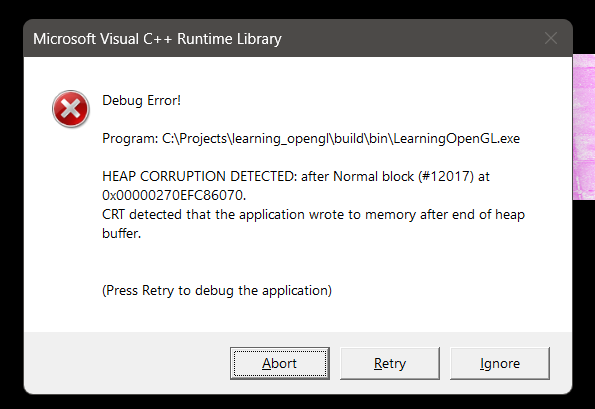
Stepping into the debugger, I found an interesting issue.
For example, if our framebuffer was 451x480, our pixel buffer (vector) would be allocated 451 * 480 * 3 = 649,440 bytes. This is good and what we expect, but at the top of the call stack, I found that 649,487 bytes were being written to the buffer! This is a 47 byte overflow, which is what caused the heap corruption.
We see the issue, but why is this happening?
After some digging, I found out that glReadPixels and OpenGL in general has the concept of pack alignment. By default, OpenGL keeps each row of pixel data aligned to 4 bytes, so sometimes it needs to add extra padding to get to the multiple of 4 bytes. That's why we were seeing the overflow!
How do we fix this?
Luckily, they provide us with a function and enum to change this behavior:
glPixelStorei(GL_PACK_ALIGNMENT, 1);
we can call this function to set the pack alignment to 1 byte, which means no padding will be added.
Perfect, this works!
I did however want to be safe and make sure to reset the pack alignment back to however many bytes it originally was after we are done capturing the framebuffer. Because of OpenGL's state machine nature, it's probably good practice to reset states after changing them like that.
So, the final function looks like this:
void Screenshot::capture(const Window& window, const std::string& filename)
{
    int width = window.getFrameBufferWidth();
    int height = window.getFrameBufferHeight();

    // save pack alignment and set new to 1 byte to avoid row padding issues!
    GLint old_pack_alignment;
    glGetIntegerv(GL_PACK_ALIGNMENT, &old_pack_alignment);
    glPixelStorei(GL_PACK_ALIGNMENT, 1);

    std::vector<unsigned char> pixels(width * height * 3);
    glReadPixels(0, 0, width, height, GL_RGB, GL_UNSIGNED_BYTE, pixels.data());

    // restore old pack alignment
    glPixelStorei(GL_PACK_ALIGNMENT, old_pack_alignment);

    // flip vertically since OpenGLs origin is bottom-left and png is top-left origin
    std::vector<unsigned char> flipped(width * height * 3);
    for (int y = 0; y < height; y++)
    {
        memcpy(&flipped[y * width * 3], &pixels[(height - 1 - y) * width * 3], width * 3);
    }

    stbi_write_png(filename.c_str(), width, height, 3, flipped.data(), width * 3);
}
Result
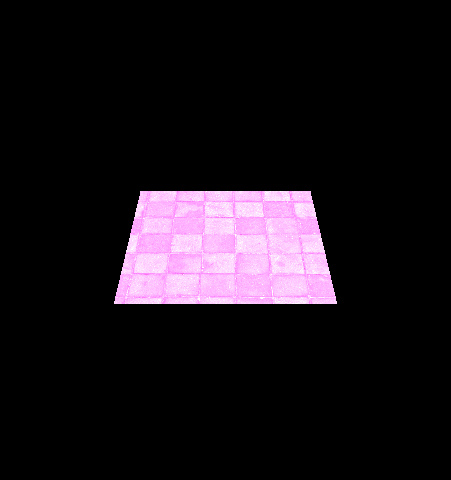
Here is a screenshot I took of my window (it needs some work, I know)